
Skip to content
Forje— home

EVH

Build the fleet. Run the service.

Category
Electric ride-service platform
Surfaces
Storefront, Owner Space, staff console
Demo
71 seconds, 15 chapters
A dark electric saloon on a wet city street at dusk.

Storefront

Build the fleet.

Seven electric models, and a configurator that turns a fleet plan into an application.

  • Seven models
  • Five-step configurator
  • Three support packages

Try the configurator

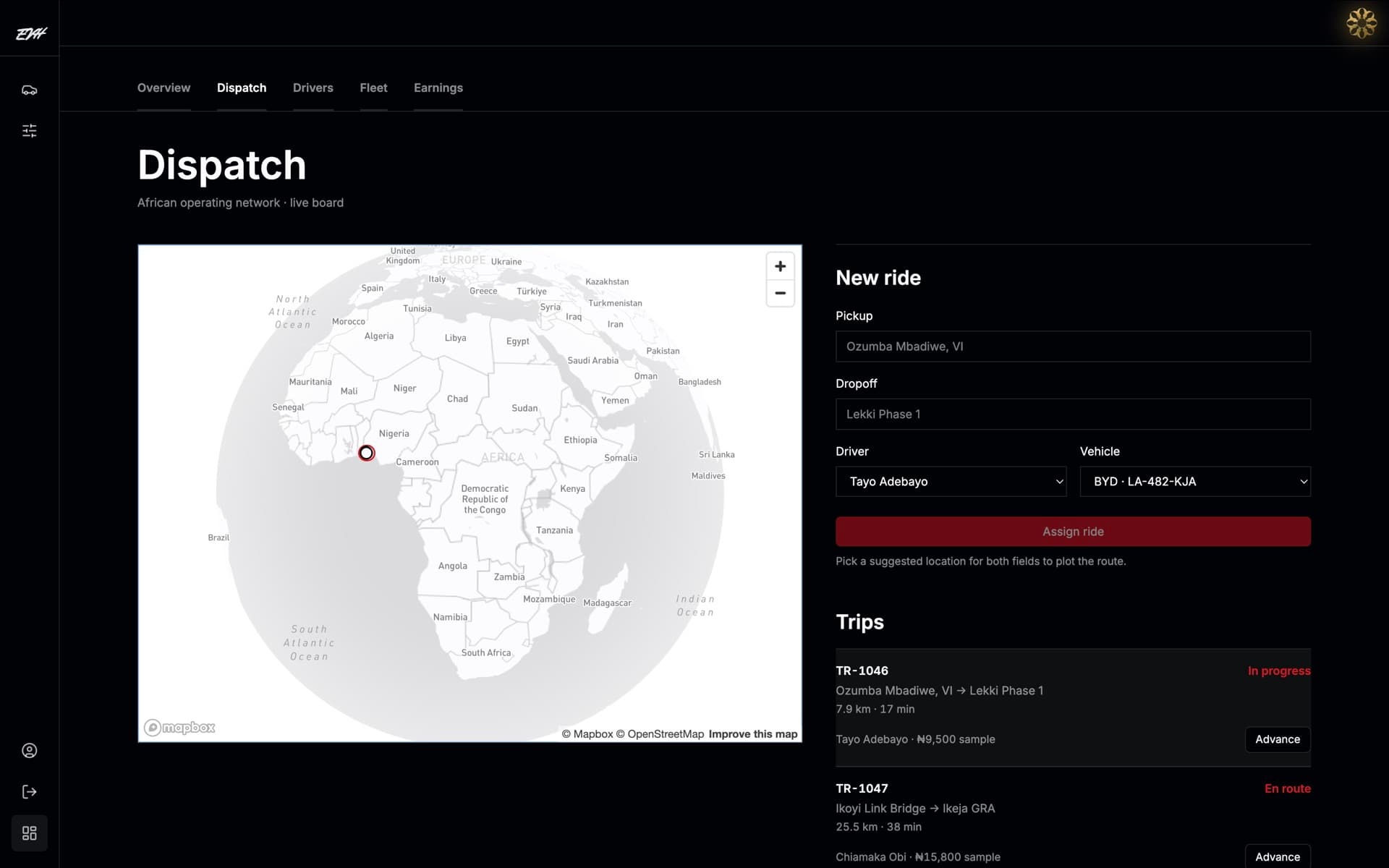
The EVH dispatch board: an Africa map beside a New ride form and a list of trips.

Owner Space and staff console

Run the service.

Dispatch, drivers, fleet and earnings for the operator, and a console where staff approve and provision every order.

  • Dispatch board
  • Driver records
  • Fleet and earnings
  • Staff approvals

Follow an order

The film, chapter by chapter

EVH sells premium electric vehicles and runs them as a ride service. One platform covers both sides: a storefront where an operator configures a fleet, a staff console where EVH approves and provisions it, and an Owner Space where the operator dispatches rides and reads earnings.

0:00 of 1:11, Chapter 1 of 15, The mark

  1. A cold open on black: the EVH wordmark, a hairline rule and the line Electric ride-service platform.

  2. The storefront opens on the product's own headline, Build the fleet. Run the service., with two ways in: Configure a fleet and Explore vehicles.

  3. The vehicle collection, one card per model. Each card opens a page for that model.

  4. Seven models: BYD, Changan, Deepal S07 EV, Dongfeng, GAC, Geely Panda EV and Hyundai Kona EV. Each carries a body type, seats, drivetrain, battery, range, power, acceleration and charging rates.

  5. The film's one quiet shot. Every model has an interior image beside its exterior, so an operator can see the cabin a driver will spend the day in.

  6. An operator signs in, finishes an organization profile and configures a fleet in five steps: city, fleet size, vehicle mix, support package and review. The request lands in the staff console's applications queue.

    Staff can approve, reject, ask for more information or leave notes, some for staff only and some the applicant can read. Approving creates an order for that organization.

  7. Staff allocate a physical unit to the order. It moves from In stock to Allocated, Delivered and Active, and every step is written to the audit log.

    The database refuses to allocate a unit until the order is marked paid. A delivered unit appears in the owner's fleet.

  8. A title card states the platform's capacity: Unlimited vehicles. One fleet. One view. It carries the film from the buying side to the owner's console.

  9. The owner's overview reads the signed-in organization's own data: fleet size, drivers on duty, utilisation, trips today and trips live right now. Utilisation is the active vehicles divided by the fleet.

    A new organization sees an empty state that says how many vehicles are on order, instead of borrowed figures. The numbers in the film are sample data.

  10. Each driver is a record: photo, phone, licence reference, status (offline, available or on a trip), assigned vehicle and shift history.

    Staff vet driver documents (national ID, passport or driver's licence) and approve or reject each with a reason. Every decision is audited.

  11. A new ride takes a pickup, a dropoff, a driver and a vehicle. The route is drawn between the two places with its distance and time, and when routing is unavailable the board draws a straight line and says so.

    Each trip moves through six stages: Requested, Assigned, En route, Arrived, In progress and Completed. The board's trips are sample data.

  12. Fleet cards deal in one vehicle at a time: its photo, VIN, plate, status (allocated, delivered, active or in maintenance) and the driver holding it.

  13. The earnings workspace sets trip revenue against driver payouts to give the fleet's net, with completed trips and average fare. It breaks revenue down by vehicle and by driver, shows each payout as pending or paid, and filters by 7 days, 30 days or the quarter.

    Every figure on it is labelled sample data in the product.

  14. A thread lights five nodes: Configure, Approve, Provision, Dispatch, Earn. The platform map further down this page follows the same five steps.

  15. The wordmark re-forms and the film ends on a short line under it.

Build the fleet

A fleet starts on the storefront. An operator browses seven models, then configures a fleet in five steps: city, fleet size, vehicle mix, support package and review.

The mix step carries the rule that matters there. The models have to add up to the fleet size before the request can be submitted. Pick models below and change the size to see it hold.

Fleet configurator · Step 3 of 5

Build your vehicle mix.

Vehicles10

0 of 10 vehicles allocated

  • Qty
    0
  • Qty
    0
  • Qty
    0
  • Qty
    0
  • Qty
    0
  • Qty
    0
  • Qty
    0
Package

Pick at least one model.

A working port of the storefront's mix step, using the product's own balancing function. Nothing you do here is sent.

Approve, pay, deliver

Staff approve an application, which creates an order. A unit is then allocated against it, delivered and set active, and each step is logged.

The order has to be paid before a unit can be allocated. Try allocating while it is still awaiting payment.

Order · EVH-SAMPLE

Awaiting payment

Unit · SAMPLEVIN0000001

  1. In stock
  2. Allocated
  3. Delivered
  4. Active

Owner's fleet

Nothing yet. A unit shows up here once it is delivered.

Audit log

  • No entries yet. Each action adds one, and none can be edited or removed.
A working port of the order and unit rules in the staff console. The order reference, VIN and every entry here are synthetic.

One platform, three surfaces

An operator signs in, finishes an organization profile and submits a fleet configuration: city, size, vehicle mix and support package.

Storefront

Visitors and operators

  • Home
  • Vehicles
  • A page for each model
  • Configure (in this step)
  • Organization profile (in this step)

Staff console

EVH staff and admins

  • Applications
  • Orders
  • Inventory
  • Drivers
  • Organizations
  • Activity

Owner Space

The operator's own organization

  • Overview
  • Dispatch
  • Drivers
  • Fleet
  • Earnings
The storefront hands an application to the staff console. The staff console hands a delivered unit to the owner's space. Staff actions are written to Activity as they happen.

Rules the platform keeps

  • The mix adds up

    A fleet request cannot be submitted until its vehicle mix adds up to the fleet size, and the form shows how many of the vehicles are allocated.

  • Approval needs an organization

    An application is approved only once it is linked to an organization, so every order has an owner and shows up in the right Owner Space.

  • No unit without a paid order

    The database rejects an allocation unless the order is marked paid. The staff console follows the rule, and the database does not depend on it.

  • Delivered means in the fleet

    When staff mark a unit delivered, it is copied into the owner's fleet with its VIN and plate, with no second entry.

  • Owners see their own, staff see all

    Row-level security keeps each owner to their own organization. Staff read across organizations through one security-definer check, so the policies never recurse.

  • The audit log only grows

    Staff actions are written with the actor, the record and its before and after. Staff can read and add entries, and no policy lets anyone edit or delete one.

The problem and the role

Starting a ride-share business usually means buying a fleet, hiring drivers and building the software.

HOC wanted to remove that barrier. The CEO's brief was to let anyone own a branded ride-share service without driving it themselves, and to make getting started feel like buying from a store.

Forje was the sole product, design and engineering partner.

The CEO asked for it, and Forje took it from the idea through to a working investor demo. That covered the product concept, the experience design and the build.

How it was built

  1. Framed it like a store. A user applies and is approved, then chooses from EVs that HOC supplies, brand new.

  2. Gave every owner their own space. They brand the service under their own name and run it from there.

  3. Kept the engine real. Dispatch, trips and live tracking are in scope, so it works as a ride-share platform and not only a management layer.

  4. Built on two tracks. A demo build served as the investor presentation, and the production build was planned separately.

  5. Gated the launch. The demo went out invite-only with simulated data, not as a public release.

Outcome

Forje delivered a complete, working EVH demo that the CEO approved.

The demo walks through the full ownership journey: applying, being approved, choosing an EV, setting up a branded ride-share service and running it from the owner's own space. It also shows live dispatch and trip tracking, so investors can see the platform operating and not only a concept.

The HOC emblem carries the brand throughout. The CEO's response to the project was strongly positive, and the demo was ready to present as an invite-only investor preview.

Lessons

A turnkey ownership model has to hide the complexity. The user should feel like they're shopping while dispatch runs underneath.

A demo on simulated data lets you show the whole product without exposing real operations.

This case study shows the EVH product. HOC Capital Club retains ownership of the products, data and marks. The vehicles, drivers, orders and figures shown here are sample data.