Ceon Energy
A commerce and planning platform for reliable energy systems.
- Stack
- Next.js / Supabase / Paystack
- Built for
- Homes, businesses and SMEs
- Payments
- Paystack, verified on the server
- Catalogue products
- 13
- Inverters, batteries, solar panels, and street lighting.
- System packages
- 12
- Six backup-only and six solar-plus-storage configurations.
- Package range
- 2–10 KVA
- 24V systems up to 3.8 KVA; 48V systems at 5 and 10 KVA.
- Operational roles
- 3
- Admin, staff, and installer access, checked on the server.
Ceon Energy provides solar installations, inverters, battery storage, and backup power systems for homes, businesses, and SMEs in Port Harcourt. The platform brings the buying decision into one place: browse specified equipment, compare pre-engineered packages, configure a custom system, estimate a starting size, then pay online or request an assessed quote.
Forje's role
Our role was to make that information easier to understand without stripping away the technical details that matter.
Forje Studios worked with CEON Energy Solutions to improve how the company presents its products and communicates its value to customers.
CEON operates in the energy space, offering inverter and power solutions across different capacities and configurations. The challenge was that products like these can quickly become technical and difficult to compare, especially for customers who may not fully understand terms such as Hybrid, Transformer, KVA ratings or battery capacity.
We worked across the website and marketing experience, focusing on the UI/UX, product presentation, pricing structure, typography, colour consistency, visual hierarchy and overall digital direction.
Size a system
The energy calculator turns everyday signals into an indicative system range. Visitors set their monthly electricity spend, daily generator use, required backup window, and property type. The tool returns estimated daily energy with inverter, battery storage, and solar array ranges, then routes to an assessment request or the configurator.
Below is that calculator working. Move the sliders, then open the working to see each number traced back to the inputs.
Your profile
Tell us how you use power
Property type
Show the working
- Grid energy a month
- ₦120,000 ÷ ₦210 per kWh
- 571.4 kWh
- Generator energy a month
- 4 h × 1.25 kW × 30 days
- 150.0 kWh
- Daily energy
- (grid + generator) ÷ 30
- 24.0 kWh
- Energy to store
- daily × 8 ÷ 24
- 8.0 kWh
- Inverter
- larger of 2 and ⌈1.25 × 1.35⌉
- 2 kVA
- Battery
- larger of 2.5 and stored ÷ 0.82, then up to 1.25 times
- 9.8–12.2 kWh
- Solar array
- larger of 1.2 and daily ÷ 4.2 sun hours, then up to 1.2 times
- 5.7–6.9 kWp
Pay, verify, confirm
Checkout collects an email address and hands payment to Paystack. Everything that decides whether an order is paid happens on the server: the total is priced from the trusted catalogue, a pending order is stored before the transaction starts, and payment is confirmed through Paystack's API and a signed webhook rather than by the browser.
Cart
Line items persist on the device, so a configured system survives a reload.
Initialize
The server prices the order from the catalogue and saves a pending order before calling Paystack.
Pay
Payment is completed in Paystack's checkout. Ceon's own forms never collect card details.
Verify
A server route re-checks the transaction reference with Paystack before the order is confirmed.
Webhook
Paystack events are accepted only with a valid HMAC-SHA512 signature of the raw body, and a unique event record stops an order from being marked paid twice.
Try the awkward cases
Money is where the edge cases are. Pick a scenario and step through it to see what the server decides.
The browser reports success, the server verifies it, and the webhook arrives after.
Step 0 of 4
- Press Start. Each step shows who acts, what the server decides and how it ends.
orders · ceon_sample_0001
No order yet
Nothing is stored before Initialize.
processed_webhook_events
No rows. A row is written the first time a payment is applied.
One row per event and reference. A second delivery hits the unique constraint, so it can never apply twice.
Demo key: demo-key-not-a-real-secret. Paystack signs real deliveries with the account's own secret key, which never leaves the server.
The product, surface by surface
One promise, three ways in
The homepage opens on a full-bleed video and a single promise: reliable energy, engineered for Nigeria. From the first frame, visitors can configure a system, explore products, or talk to a specialist. Further down, a power-path selector reframes the same choice as Home, Business / SME, or Custom project, each with a suggested system range, typical loads, and its own next step.
Configure a system
Straight into the configurator.
Explore products
The equipment catalogue.
Talk to a specialist
A project assessment request.
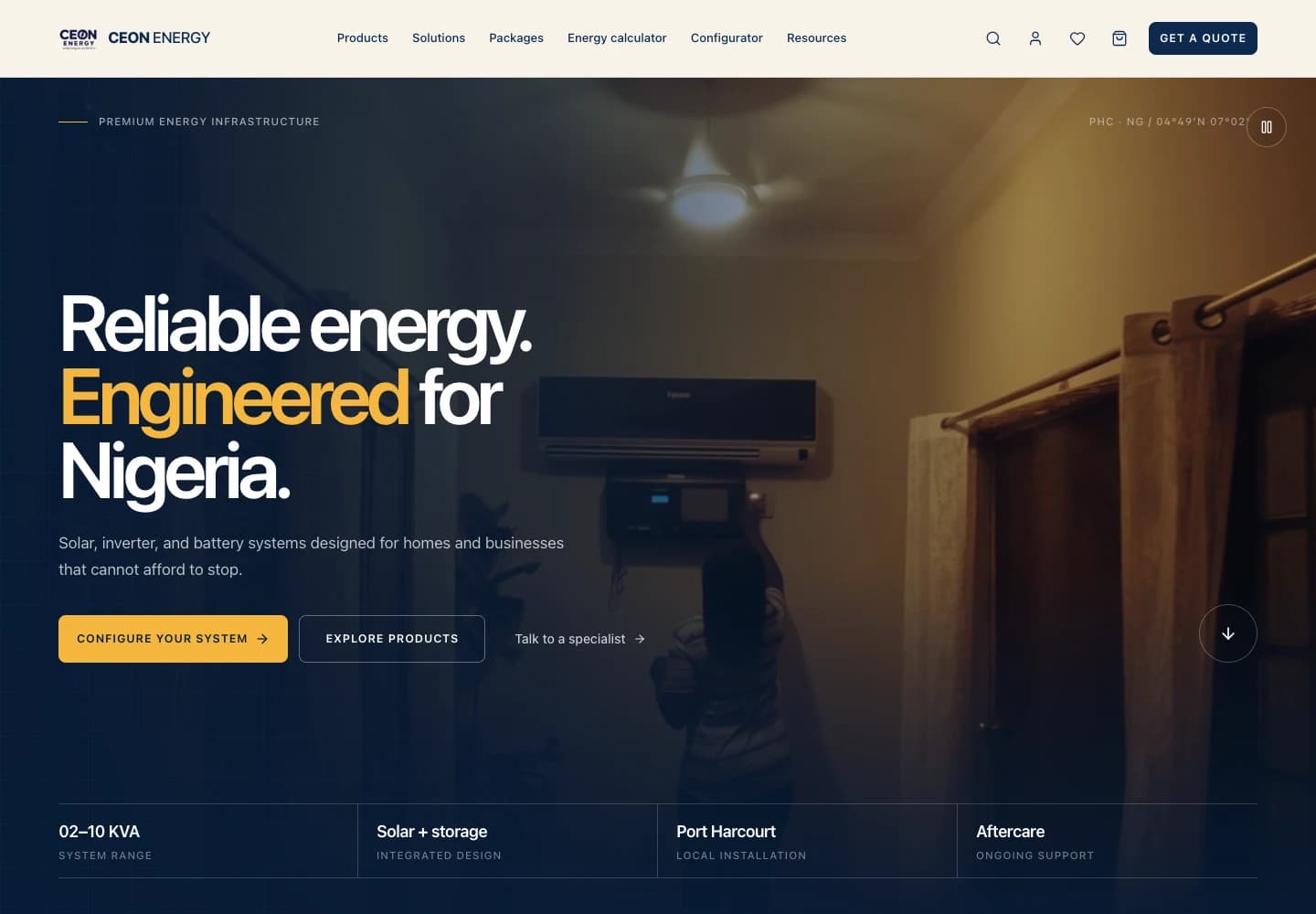
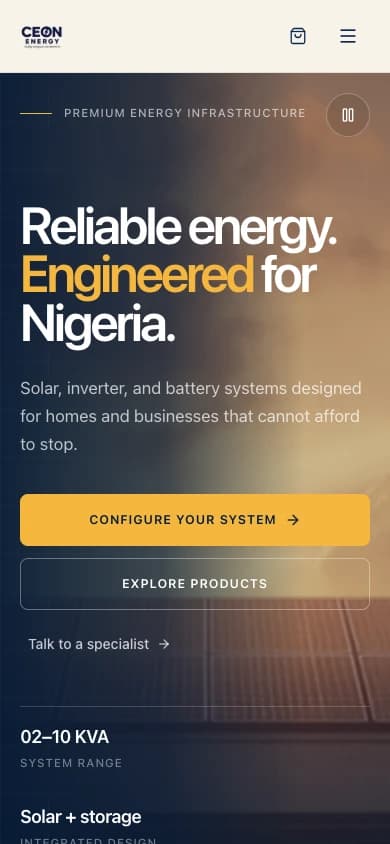
Interface captures come from a production build of the current Ceon Energy codebase.
The process
We started by looking at the experience from the customer's point of view.
If someone lands on the CEON platform looking for an inverter, how quickly can they understand what is available, what the differences are and which option might suit their needs? That question shaped most of the work.
We reorganised the product information so that capacities, inverter types, prices and supporting details followed a clearer structure. Products such as the 2KVA, 3KVA, 3.8KVA and 5KVA systems needed to feel like part of one organised catalogue rather than separate pieces of information.
We also reviewed how the products were visually presented. This included improving spacing, typography, product cards, imagery, calls to action and the relationship between different sections of the page.
Another important part of the process was making sure the design could grow with the business. CEON may have a certain number of products today, but the system needed to work just as well when more inverters, batteries, solar products or other energy solutions are added later.
Because of that, we focused on reusable patterns instead of designing every product or section differently.
Our approach
A customer should not need an engineering background to understand what CEON is selling.
One of the main goals was to find the right balance between technical information and simplicity.
At the same time, we did not want to oversimplify the products or remove information that more knowledgeable customers would expect to see.
So we built the experience around a few simple questions:
- What is the product?
- What capacity does it offer?
- How is it different from the other options?
- How much does it cost?
From there, the rest of the design could support the customer instead of competing for their attention.
We also worked toward a more consistent visual system so that the website, pricing information and marketing materials felt connected to the same brand.
Accounts and access
Customers can create an account, follow their orders, keep a saved list, and manage their profile. Behind them, the admin area establishes roles, access control, and row-level security for the operational tools that follow. Only that foundation is claimed here: the operational modules are planned for later phases.
Complete
Customer accounts
- Email sign-up and sign-in
- Password reset by email
- Account overview with orders and total spend
- Order history with status
- Saved-items list
- Profile details and avatar upload
In place
Admin foundation
- Admin, staff, and installer roles
- Request-level and server-side access checks
- Row-level security on customer data
- Database guard against client-side role changes
- Role-aware workspace navigation
Planned
Operational modules
- Orders and leads
- Content and scheduling
- Installer jobs
- Refunds, team, and financials
Planned modules appear in the admin workspace as disabled, coming-soon items. They are not part of this delivery.
Rules the platform keeps
The server sets the price
The total is worked out from the catalogue on the server. A price sent by the browser is never read, so a tampered request cannot buy for less.
A pending order comes first
The order is saved before Paystack is called. If that call fails, the result is a harmless pending order, not a charge with nothing to match it.
The browser's word is not enough
When the popup reports success, the server asks Paystack for the transaction by reference before it marks anything paid.
Signatures cover the raw body
A webhook is accepted only if the HMAC-SHA512 of its untouched body matches the signature header. Parsing and re-serialising first would change the hash.
One event, one effect
A unique record per event and reference means a retried webhook, or the browser's verify call racing the webhook, applies the payment once. Whichever arrives first wins.
Roles change only from trusted code
A database trigger refuses role and admin changes that come from a signed-in browser. Only server code can make them.
Under the hood
The configurator, calculator, filters, and cart run entirely in the browser, so they respond without waiting on the network. Anything involving money, identity, or permissions is resolved on the server. The entries below are limited to what the current codebase contains.
- Framework
- Next.js 16 + React 19
- App Router and TypeScript, with server-rendered account and admin routes and client components for the interactive tools.
- Interface
- Tailwind CSS v4 + Radix
- A tokenised navy, ivory, and amber theme, with Radix primitives for dialogs, sheets, tabs, and sliders.
- State
- Zustand
- Persisted cart and saved-items stores. One cart is shared by the catalogue, packages, configurator, and checkout.
- Data and auth
- Supabase
- Auth, Postgres, and Storage, with row-level security and a service-role client restricted to server-only code.
- Payments
- Paystack
- Server-side initialization and verification, plus a signed webhook with an equivalent Supabase Edge Function version.
- Motion
- Framer Motion + Lenis
- Entrance and scroll reveals with smooth scrolling, both reduced or removed when visitors prefer less motion.
Outcome
The result was a clearer and more organised way for CEON to present its products.
Customers can more easily understand the different product options, while CEON has a stronger structure for adding and updating products over time.
The work also gave the brand a more consistent digital direction across its website, pricing and marketing materials.
More importantly, the project created a stronger foundation rather than just giving the interface a new look. It gave CEON a system that can continue to evolve as the company grows.
What we learned
One of the biggest lessons from the project was that technical products do not always need more explanation. Sometimes they need better organisation.
When information is presented clearly, even a technical product becomes much easier to understand.
We also learned how important consistency is when dealing with a growing product catalogue. Product names, prices, specifications and images can change regularly, so the design has to make those updates easy without creating confusion elsewhere.
Another key lesson was to design for growth from the beginning. Instead of thinking only about the products CEON currently sells, we built the experience around a structure that could support more products and categories in the future.
Good design is not about making complex things look simple. It is about making them easier to understand and use.
This case study documents Forje's digital product design and frontend/full-stack implementation contribution. Ceon Energy retains ownership of its business, products, brand, operational data, and customer relationships.